FortiGate SD-WAN
Real-time Health Monitor
All-in-one network quality monitoring platform: Real-time collection of latency, jitter, packet loss metrics → Intelligent threshold alerts → Historical data visualization → Multi-channel notifications via Email/Webhook
Why You Need Professional Network Monitoring
Traditional network management faces numerous challenges. Our solution helps you address these pain points.
Core Features
Comprehensive network health monitoring capabilities for enterprise network operations
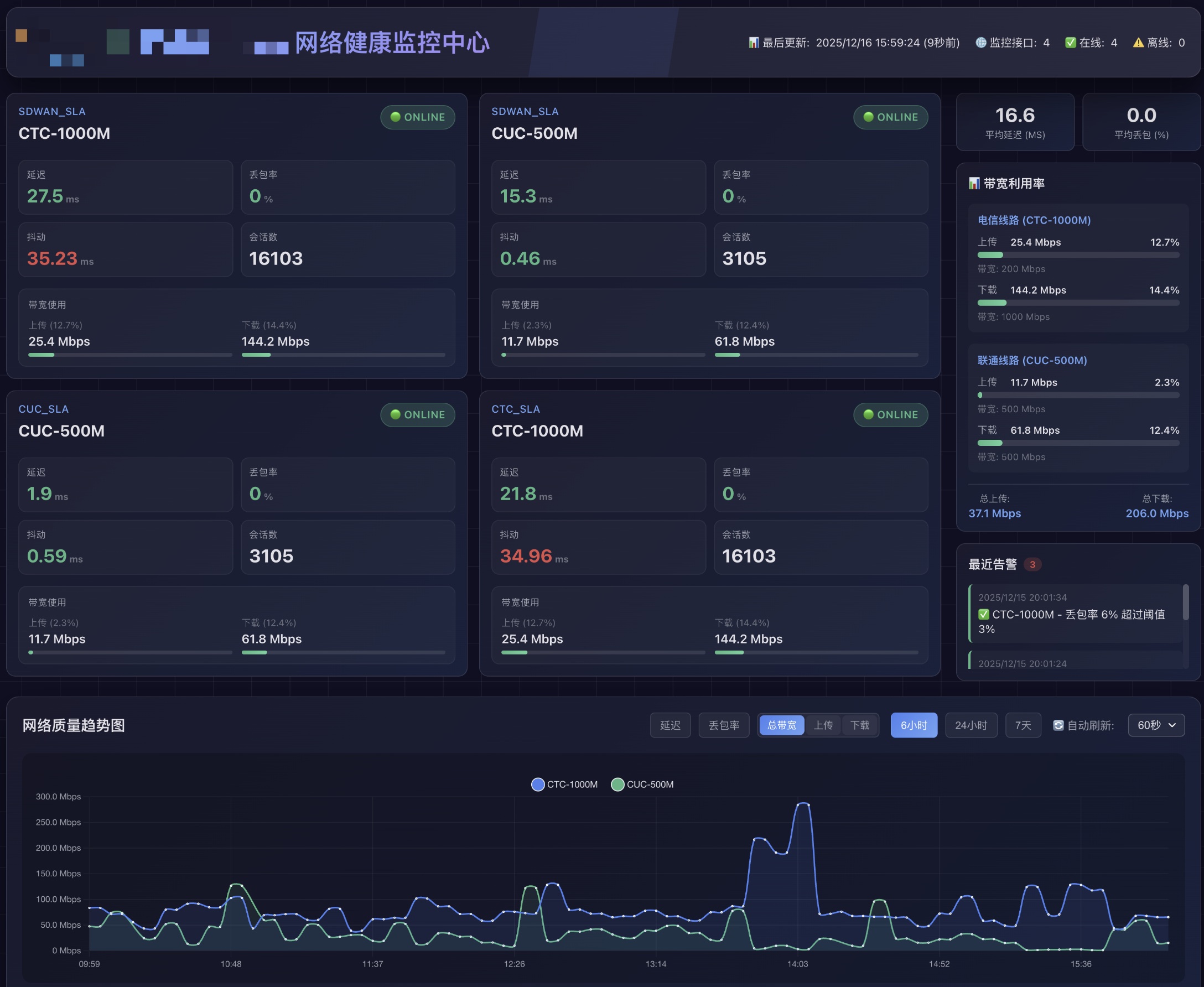
Real-time Health Status Monitoring
Automatically collects FortiGate SD-WAN Health Check data, displaying real-time interface status, latency, jitter, packet loss, and other key metrics.
Bandwidth Utilization Analysis
Monitor upload/download bandwidth usage for each link, displaying utilization percentages to assist with capacity planning and cost optimization.
Network Quality Trend Charts
Support 6-hour/24-hour/7-day multi-dimensional historical data visualization, quickly identifying network quality fluctuation times and causes.
Intelligent Threshold Alerts
Customize latency and packet loss alert thresholds. Interface status changes automatically trigger alerts with cooldown support to prevent duplicates.
Multi-channel Notifications
Support Email (SMTP), Microsoft Graph API, Webhook, and other notification methods to ensure alerts are delivered promptly.
Persistent Data Storage
Lightweight SQLite-based data storage, fully preserving historical health check data and alert records, supporting data export and analysis.
Intuitive Monitoring Dashboard
Dark theme design, data at a glance, supports auto-refresh
Online/offline status updates in real-time. Green indicates normal, red indicates fault. Quickly grasp the overall situation.
Each interface has an independent card displaying latency, packet loss, jitter, session count, bandwidth, and other complete metrics.
Supports 60-second auto-refresh, data updates in real-time, no manual operation required.
System Architecture
Modular design, lightweight deployment, easy to extend
Data Collection
Uses Playwright to simulate browser login to FortiGate, calling SD-WAN Health Check API to retrieve raw data.
Data Storage
Persists health check data and alert records to SQLite database, supporting historical queries and analysis.
Status Analysis
Real-time comparison of interface status changes, detecting if quality metrics exceed thresholds, intelligently determining if alerts are needed.
Alert Notifications
Triggers alerts on status anomalies, supporting Email, Graph API, Webhook, and other multi-channel notifications with built-in cooldown mechanism.
Comparison with Traditional Methods
Significant advantages brought by professional monitoring systems
| Comparison Item | Traditional Method | Network Health Monitor |
|---|---|---|
| Fault Discovery | Reactive after user complaints | Real-time monitoring, instant alerts |
| Historical Data | No records or scattered in logs | Complete storage, trend visualization |
| Alert Notifications | Native FortiGate, limited features | Multi-channel, custom thresholds, cooldown |
| Visualization | Requires FortiGate login to view | Independent web interface, access anytime |
| Multi-link Management | Check one by one, inefficient | Unified view, everything at a glance |
Tech Stack
Frequently Asked Questions
Common questions about the FortiGate SD-WAN Network Health Monitor
Why do I need a professional FortiGate SD-WAN monitoring system?
Traditional network management has three major pain points:
- Delayed fault discovery: When SD-WAN links fail or quality degrades, issues are often discovered only after user complaints
- Lack of historical data: Without complete network quality history, it's difficult to analyze trends and locate intermittent issues
- Limited alerting: Native FortiGate alerting has limited capabilities, no custom thresholds, and single notification channel
Professional monitoring enables real-time monitoring, instant alerts, complete historical data storage, and trend visualization, reducing fault discovery time from hours to seconds.
What network metrics does the system monitor?
The system comprehensively monitors all key metrics from FortiGate SD-WAN Health Check:
- Latency: Network round-trip time, reflecting network response speed
- Jitter: Degree of latency variation, affecting real-time application quality
- Packet Loss: Percentage of lost data packets, directly affecting transmission quality
- Bandwidth Utilization: Upload/download bandwidth usage and utilization percentage
- Interface Status: Real-time online/offline status monitoring
- Session Count: Number of current active connections
All metrics support customizable alert thresholds, automatically triggering alerts when metrics exceed set values.
What alert notification methods are supported?
The system supports multiple alert notification channels to ensure critical information is delivered promptly:
- Email (SMTP): Supports Gmail, Outlook, QQ Mail, and other mainstream email services
- Microsoft Graph API: Enterprise-grade Microsoft 365 integration
- Webhook: Can connect to DingTalk, WeChat Work, Slack, and other collaboration platforms
Built-in alert cooldown mechanism (default 5 minutes) prevents repeated alerts for the same issue. Supports recovery notifications, automatically sending recovery notices when issues are resolved.
How do I deploy the Network Health Monitor?
The system uses lightweight architecture for quick and easy deployment:
- Requirements: Node.js 16+ runtime environment
- Supported Platforms: Linux, Windows, macOS
- Data Storage: SQLite (zero configuration, no additional database service required)
- Deployment Methods: Supports direct execution, PM2 process management, Docker containerized deployment
Deployment Steps: Install dependencies → Configure .env file (FortiGate address, alert settings) → Initialize database → Start monitoring service.
How does the system connect to FortiGate devices?
The system connects to FortiGate via Playwright browser automation technology:
- Simulates browser login to FortiGate Web management interface
- Calls
/api/v2/monitor/virtual-wan/health-checkAPI to retrieve data - Automatically maintains login session, re-authenticates when session expires
The advantage is no need to enable FortiGate API access permissions, just provide admin credentials. The system maintains a persistent browser session to avoid frequent logins.
How long is historical data retained?
The system uses SQLite database to store all historical data:
- Health Check Data: Retained permanently by default, can be cleaned via scripts
- Alert Records: Complete history of all alerts and delivery status
- Raw JSON Data: Preserves complete raw data from API responses for subsequent analysis
Web interface supports 6-hour / 24-hour / 7-day trend chart viewing. Data export supports exporting historical data to CSV or JSON format for offline analysis.
Get the Solution
Our Network Health Monitor can be customized and deployed according to your enterprise needs. Contact us for consultation.